Everforest
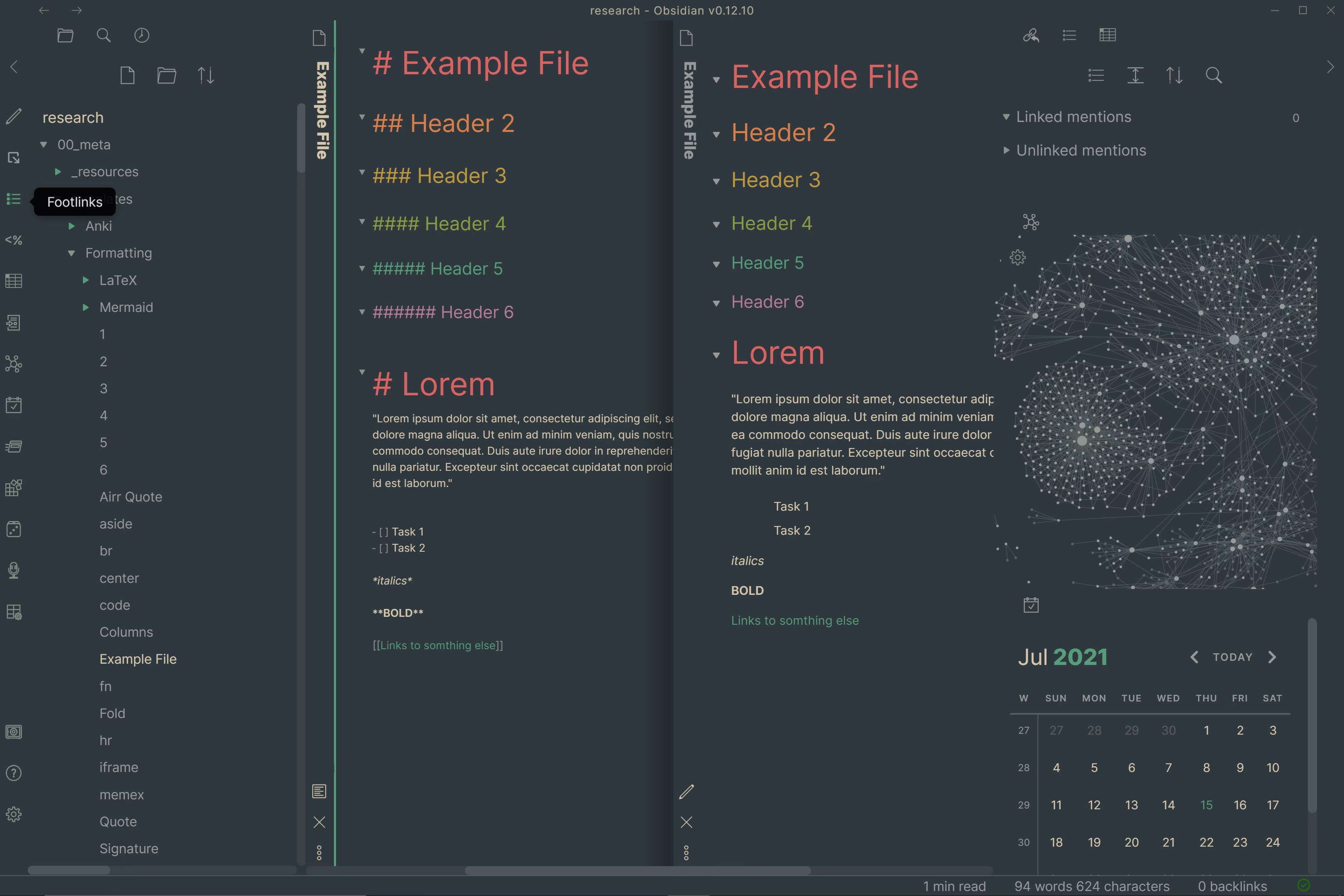
A comforting, nature-inspired green color scheme based on the popular Everforest palette. Easy on the eyes for long editing sessions.
MrGlitchByte is credited as the original theme creator. Setup notes, fit assessments, and cautions below are Obsidian Mate editorial guidance. How we review resources
Overview
A comforting, nature-inspired green color scheme based on the popular Everforest palette. Easy on the eyes for long editing sessions.
Standard Installation Instructions (Theme)
- 1.In Obsidian, open Settings, then Appearance.
- 2.Under Themes, click Manage and then Browse.
- 3.Search for Everforest, then click Install and use.
- 4.Optionally install the Style Settings plugin to customize it.
Details
- Modes
- Dark & Light
Recommended Setup & Style Settings
To get the most out of Everforest, follow these step-by-step setup recommendations to customize colors, accent schemes, typography, and layout width:
- 1
Install the Theme
Go to Settings, then Appearance, Themes, and Manage, search for Everforest, and click Install and use.
- 2
Install Style Settings Plugin
Install the Style Settings plugin from Community Plugins to unlock hundreds of tweakable toggles for accent colors, fonts, margins, and custom CSS variables.
- 3
Customize Accent Schemes & Typography
Open Settings, then Style Settings, then Everforest to switch accent color palettes, adjust line width, customize header colors, and enable special features like rainbow folders.
- 4
Recommended Vault Templates & Plugin Combinations
Pair Everforest with pre-configured vault templates and recommended community plugins to complete your second brain setup:
Recommended Vault Templates
- Ideaverse (LYT Starter Vault)
Gold standard PKM vault setup by Nick Milo.
- PARA Starter Kit Vault
Tiago Forte's PARA method starter setup.
- Zettelkasten Starter Vault
Structured note-linking vault template for research.
Recommended Plugins
- Style Settings Plugin
Graphical customization menu for themes & CSS.
- Dataview Plugin
Database query views & dynamic dashboards.
- Templater Plugin
Dynamic template engine for automated note creation.
Related Obsidian Themes
Catppuccin
The official Catppuccin port for Obsidian. Four beautiful pastel color palettes (Latte, Frappé, Macchiato, Mocha) with warm, soothing colorscapes.
Flexoki
An inky, warm color scheme by the creator of Minimal. Designed for comfortable long reads with high readability and a natural, organic feel.
Discordian
Inspired by Discord's dark theme. A familiar, comfortable color scheme for users who love Discord's UI aesthetic.
Obsidian Gruvbox
The beloved Gruvbox color scheme for Obsidian. Retro groove with warm, earthy tones and excellent contrast for low-light environments.
Explore more Obsidian resources
Discover more plugins, themes, templates, and starter vaults to build your perfect Obsidian setup.