Dataview
Query your Markdown notes like a database and build automated dashboards, lists, and MOCs.
Michael Brenan is credited as the original plugin creator. Setup notes, fit assessments, and cautions below are Obsidian Mate editorial guidance. How we review resources
Overview
Dataview is the plugin that turns Obsidian from a note-taking app into a personal database. It reads the metadata and structure already in your notes: tags, links, front-matter fields, tasks: and lets you query it with a SQL-like language or JavaScript. Instead of manually maintaining index notes, you write a query once and Dataview keeps the results up to date forever.
Key Features
- Query notes with a readable, SQL-like Dataview Query Language (DQL)
- Full JavaScript API (dataviewjs) for advanced, custom views
- Inline fields and front-matter metadata as first-class data
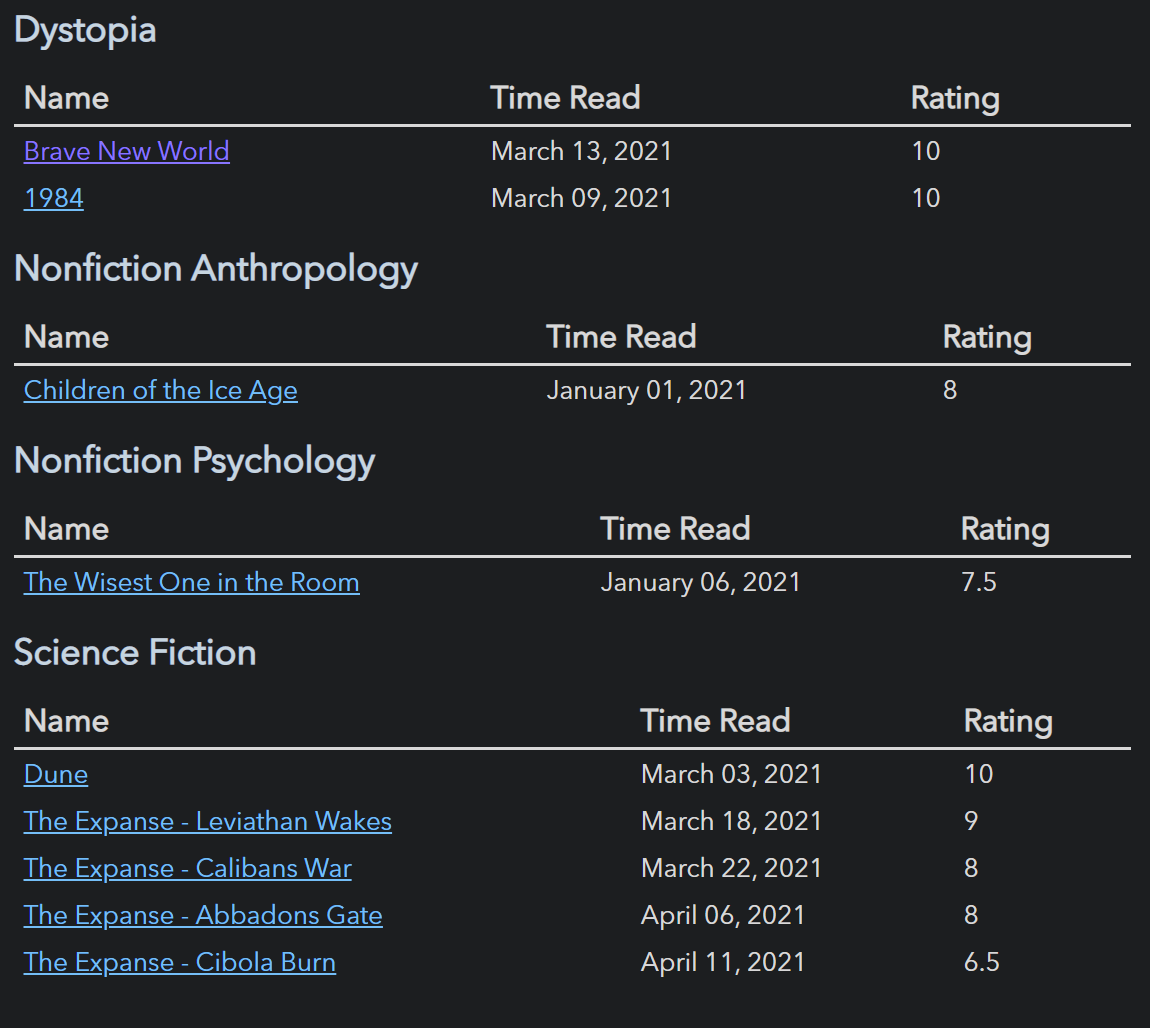
- Table, list, task, and calendar output formats
- Automated Maps of Content and dashboards that never go stale
How to Install Dataview
- 1Open Settings, then Community plugins and disable Restricted mode.
- 2Click Browse and search for "Dataview".
- 3Click Install, then Enable.
- 4Add metadata to your notes (front-matter or inline fields like key:: value).
- 5Create a code block with the language `dataview` and write your first query.
How to Use Dataview
Write queries inside a fenced code block that starts with `dataview`. A basic query like `TABLE file.mtime AS "Modified" FROM #project SORT file.mtime DESC` lists every note tagged #project, newest first.
For anything the query language cannot express, switch to a `dataviewjs` block and use the full JavaScript API to render completely custom views. Start simple with LIST and TABLE queries before moving to JavaScript.
Who Dataview Is For
Dataview is most useful when notes follow a repeatable metadata pattern: projects have statuses, books have ratings, or meetings have dates and owners. A saved query recalculates from the vault index instead of requiring a manually maintained index note. If you only need full-text search or keep a small collection without properties, Obsidian search is simpler and adds no query language to learn.
Example: A Project Dashboard
Add consistent status and due properties to each project note, then place this DQL block in a dashboard. FROM limits work to the Projects folder, WHERE excludes completed items, and SORT puts the next deadline first. Dataview can only query indexed content, so ordinary prose is not a substitute for properties or inline fields.
TABLE status AS "Status", due AS "Due"
FROM "Projects"
WHERE status != "done"
SORT due ASC
Limits and Common Mistakes
- Dataview is primarily a display and calculation tool. It does not rewrite note metadata; checking a task in a Dataview task result is the notable exception.
- Inconsistent field names or data types produce incomplete results. Standardize both before building a large dashboard.
- DataviewJS executes JavaScript in the vault. Use it only when DQL cannot express the view, and review copied scripts before running them.
- Narrow large queries by folder or tag before adding complex filters and calculations.
Repository Screenshots & Visual Preview
Rich preview screenshots and visual assets extracted directly from the official GitHub repository for Dataview:
Details
- GitHub stars
- 9.5k+
- Requires Obsidian
- 0.13.11+
- Platforms
- Desktop, Mobile
- License
- MIT
Frequently Asked Questions
Is Dataview hard to learn?
The basics are easy: a LIST or TABLE query is one line. The JavaScript API is more advanced, but most users never need it. Start with the query language and grow from there.
Does Dataview work on mobile?
Yes. Dataview runs on both desktop and mobile Obsidian, though very large vaults may render queries more slowly on phones.
Does Dataview modify my notes?
No. Dataview only reads your notes and renders results at view time. Your Markdown files stay untouched and portable.
Sources and Documentation
This guide was checked against the creator's repository and primary documentation.
Related Obsidian Plugins
Templater
A powerful template engine with dynamic dates, prompts, and JavaScript for automating note creation.
Tasks
Track tasks across your whole vault with due dates, recurrence, priorities, and powerful queries.
Projects
Project management views for Obsidian: table, board, calendar, and gallery views. Manage notes as project items with properties, filters, and sorting.
DB Folder
Notion-like database views for your folders. Create filtered, sorted, and grouped table views of notes with editable properties: like a spreadsheet for your vault.
Related Guides
Build an Obsidian Second Brain With Claude Code
Design a reviewable Obsidian and Claude Code system for capture, daily planning, research, and weekly synthesis without treating AI output as memory or fact.

Obsidian vs Notion in 2026: Which Fits Your Workflow?
Compare Obsidian and Notion across storage, offline work, collaboration, customization, privacy, and portability without invented benchmark scores.
Obsidian Properties: The Complete Guide
Master Obsidian Properties from zero to expert: YAML frontmatter, every property type, Bases, Dataview, templates, naming conventions, real-world examples, and performance tips for large vaults.
Explore more Obsidian resources
Discover more plugins, themes, templates, and starter vaults to build your perfect Obsidian setup.