Tasks
Track tasks across your whole vault with due dates, recurrence, priorities, and powerful queries.
Martin Schenck & Clare Macrae is credited as the original plugin creator. Setup notes, fit assessments, and cautions below are Obsidian Mate editorial guidance. How we review resources
Overview
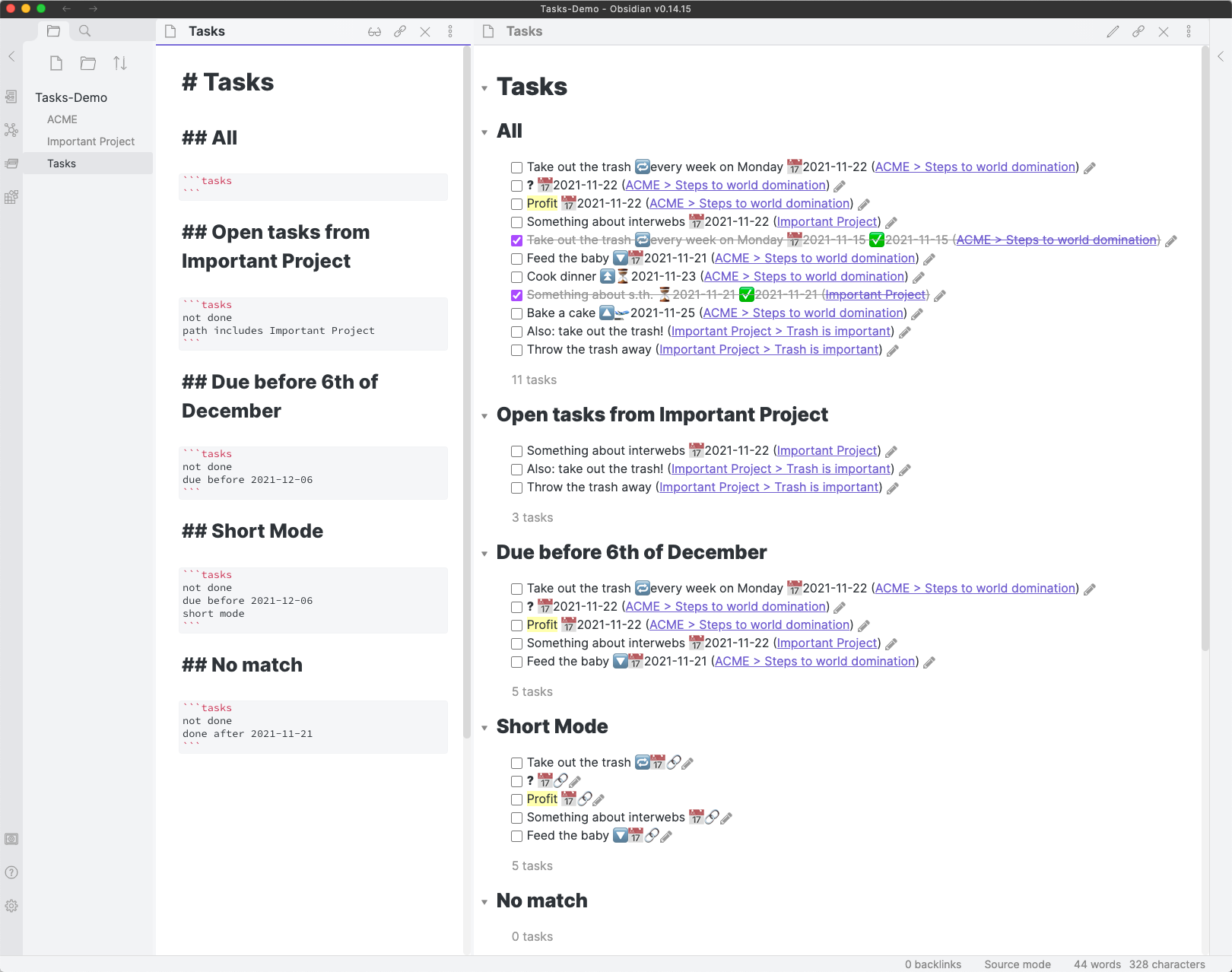
The Tasks plugin gives Obsidian a real task management system without leaving your notes. Any checkbox in any note becomes a trackable task, and you can attach due dates, scheduled dates, priorities, and recurrence rules using a simple emoji syntax. A query block then pulls tasks from across your entire vault into a single filtered, sorted view.
Key Features
- Due, scheduled, start, and done dates on any checkbox task
- Recurring tasks that regenerate when completed
- Priorities and custom statuses
- A query language to build filtered task dashboards
- One-click date editing and completion from query results
How to Install Tasks
- 1Open Settings, then Community plugins and disable Restricted mode.
- 2Click Browse, search for "Tasks", then Install and Enable.
- 3Add a task with a due date, e.g. - [ ] Write report 📅 2026-08-01.
- 4Create a `tasks` code block and add filters like "not done" and "due before next week".
How to Use Tasks
Create tasks as normal Markdown checkboxes and append date emojis: 📅 for due, ⏳ for scheduled, 🔺/🔼/🔽 for priority.
Build a dashboard by adding a fenced code block with the language `tasks` and one filter per line. The plugin renders a live, interactive list you can check off directly.
When Tasks Adds Value
Tasks suits people who capture actions in the notes where work is discussed but review them from central dashboards. It is especially useful for recurring and date-based work. If one short checklist in one note is enough, core Markdown checkboxes are easier and avoid plugin-specific syntax.
Example: A Focused Weekly Dashboard
Put this query in a planning note. It excludes completed items, selects tasks due before next week, sorts by due date, groups by source file, and limits the output. Clicking a result checkbox updates the original task in its source note.
not done
due before next week
sort by due
group by filename
limit 25
Common Mistakes and Boundaries
- Queries interpret metadata written in supported task formats; a date in ordinary prose is not automatically a due date.
- Filter large-vault queries by path, tag, or date before adding complex grouping and sorting.
- Test whether a recurrence should advance from its scheduled date or from completion before using it widely.
- Tasks is not a multi-user assignment system; shared-vault ownership and edit conflicts need separate conventions.
Repository Screenshots & Visual Preview
Rich preview screenshots and visual assets extracted directly from the official GitHub repository for Tasks:
Details
- GitHub stars
- 3k+
- Platforms
- Desktop, Mobile
- License
- MIT
Frequently Asked Questions
Does the Tasks plugin work with Dataview?
Yes. Many users combine them: Tasks for its purpose-built query syntax and date handling, and Dataview for broader metadata dashboards. They complement each other.
Are my tasks stored in a separate database?
No. Tasks are just Markdown checkboxes in your notes. The plugin reads and queries them, so your data stays plain-text and portable.
Sources and Documentation
This guide was checked against the creator's repository and primary documentation.
Related Obsidian Plugins
Kanban
Create Markdown-backed Kanban boards inside Obsidian for project management and task tracking.
Dataview
Query your Markdown notes like a database and build automated dashboards, lists, and MOCs.
Day Planner
Time-blocking and daily schedule management inside Obsidian. Write a time-blocked plan in your daily note and see it rendered as a visual timeline in the sidebar.
Projects
Project management views for Obsidian: table, board, calendar, and gallery views. Manage notes as project items with properties, filters, and sorting.
Related Guides

7 Obsidian Plugins by Workflow: What They Add and What to Check
A workflow-based guide to seven Obsidian plugins for sync, visualization, calendars, planning, and writing, with selection criteria, limitations, and safety checks.
Build an Obsidian Second Brain With Claude Code
Design a reviewable Obsidian and Claude Code system for capture, daily planning, research, and weekly synthesis without treating AI output as memory or fact.
Explore more Obsidian resources
Discover more plugins, themes, templates, and starter vaults to build your perfect Obsidian setup.