Kanban
Create Markdown-backed Kanban boards inside Obsidian for project management and task tracking.
Matthew Meyers is credited as the original plugin creator. Setup notes, fit assessments, and cautions below are Obsidian Mate editorial guidance. How we review resources
Overview
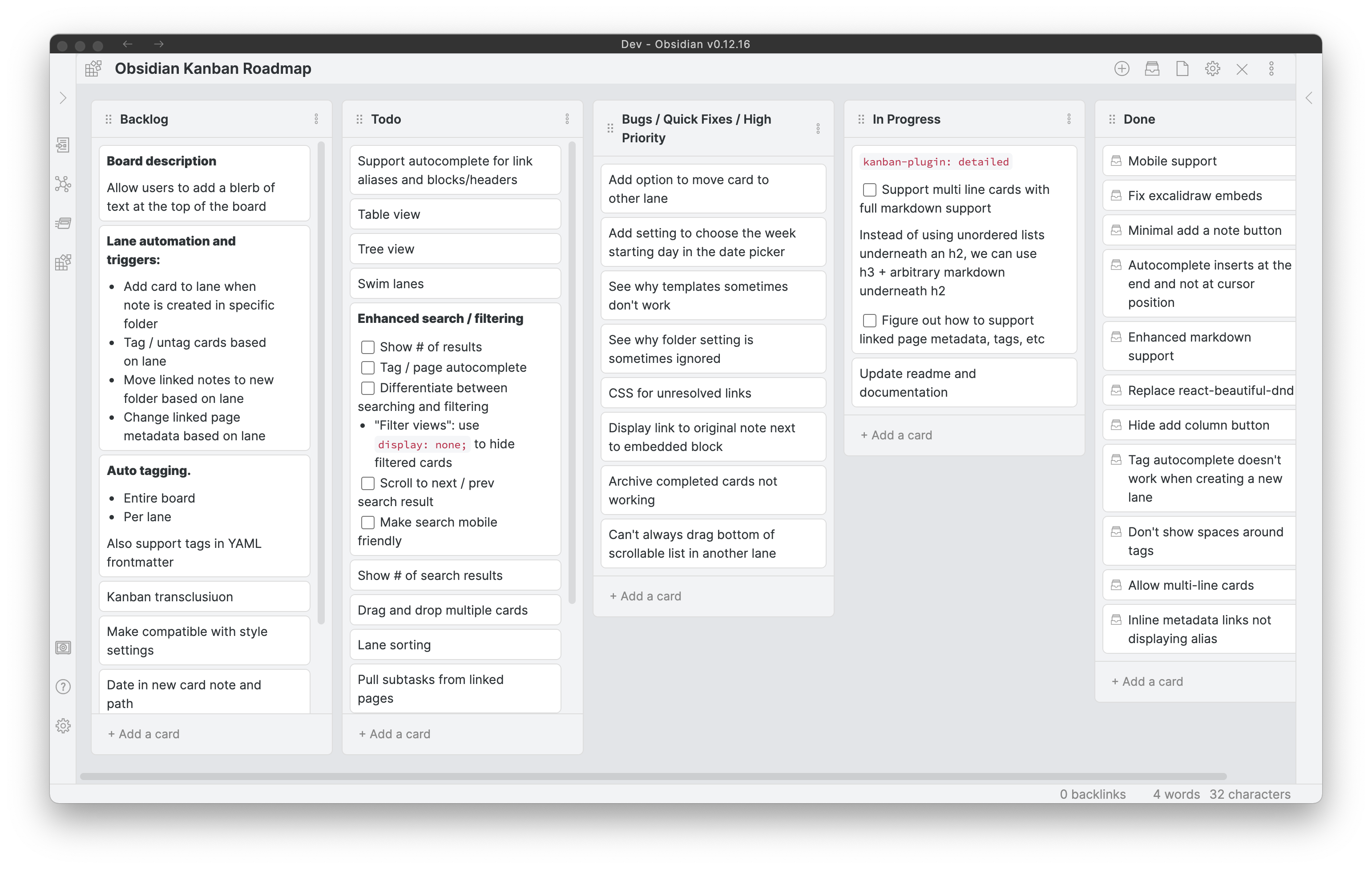
The Kanban plugin turns your Obsidian vault into a powerful project management hub. Created by Matthew Meyers, it lets you build Trello-style boards with drag-and-drop cards. Because every board is stored as a plain Markdown file, your project data remains human-readable, searchable, and fully under your control.
Key Features
- Drag-and-drop cards and columns for visual task tracking
- Full Markdown support inside card descriptions, including tags and due dates
- Link cards directly to other notes in your vault using [[Note]] syntax
- Archive completed lists and cards to keep boards clean
- Custom board settings for date formats and default note templates
How to Install Kanban
- 1Open Settings, then Community plugins and disable Restricted mode.
- 2Click Browse, search for "Kanban", then Install and Enable.
- 3Create a new note, open the command palette, and select "Kanban: Create new board".
- 4Add lists like Todo, In Progress, Done, and drag cards between columns.
How to Use Kanban
Create a board from the command palette, name lanes for real workflow states, and keep each card small enough to scan. Cards can contain Markdown, tags, links, dates, and checkboxes; link a card to a separate note when the work needs specifications or long-form context.
Use the board for flow and linked notes for durable project knowledge. This keeps the board readable while preserving detail in ordinary vault files.
Who Should Use a Markdown Kanban Board
Kanban works well for personal projects and small workflows where seeing work move from Backlog to Doing to Done matters more than reporting. It is less suitable for teams needing permissions, simultaneous editing, audit logs, or cross-project portfolio reporting; those needs usually justify a dedicated service.
Example: A Weekly Content Flow
Start with Backlog, Drafting, Editing, and Published lanes. Keep titles action-oriented, then add a note link and due date in the card body. The board remains Markdown-backed, and current releases also offer table and stacked-list views plus Tasks integration.
Draft the plugin guide

[[Plugin Guide Brief]]

- [ ] Verify official sources
- [ ] Add screenshot caption

@2026-09-10 #content
Maintenance and Workflow Limits
- The repository now lives in the community-archive organization and asks for new maintainers. Check releases and open issues before relying on it for critical work.
- Avoid editing the generated board structure simultaneously in source mode and board view.
- Test the exact card format you plan to query before migrating an established Tasks workflow.
- Keep a backup before large lane moves so accidental edits are recoverable.
Repository Screenshots & Visual Preview
Rich preview screenshots and visual assets extracted directly from the official GitHub repository for Kanban:
Details
- GitHub stars
- 3.5k+
Frequently Asked Questions
How are Kanban boards stored in my vault?
Kanban boards are saved as standard Markdown files containing formatted bullet lists. If you disable the plugin, your board data remains readable as plain lists.
Can I use the Kanban plugin alongside the Tasks plugin?
Yes. Checkboxes inside Kanban cards are recognized by task query plugins, letting you build unified project dashboards.
Sources and Documentation
This guide was checked against the creator's repository and primary documentation.
Related Obsidian Plugins
Tasks
Track tasks across your whole vault with due dates, recurrence, priorities, and powerful queries.
Projects
Project management views for Obsidian: table, board, calendar, and gallery views. Manage notes as project items with properties, filters, and sorting.
Rollover Daily Todos
Automatically carry over unfinished checkboxes from yesterday's daily note into today's. Never lose track of incomplete tasks between days.
Dataview
Query your Markdown notes like a database and build automated dashboards, lists, and MOCs.
Related Guides

Obsidian vs Notion in 2026: Which Fits Your Workflow?
Compare Obsidian and Notion across storage, offline work, collaboration, customization, privacy, and portability without invented benchmark scores.
Kanban Flow for Obsidian: Setup, Boards, and Project Workflows
A practical guide to Kanban Flow for Obsidian: install the plugin, configure boards and milestones, manage task metadata, and understand its local JSON storage and sync limits.

7 Obsidian Plugins by Workflow: What They Add and What to Check
A workflow-based guide to seven Obsidian plugins for sync, visualization, calendars, planning, and writing, with selection criteria, limitations, and safety checks.
Explore more Obsidian resources
Discover more plugins, themes, templates, and starter vaults to build your perfect Obsidian setup.