Calendar
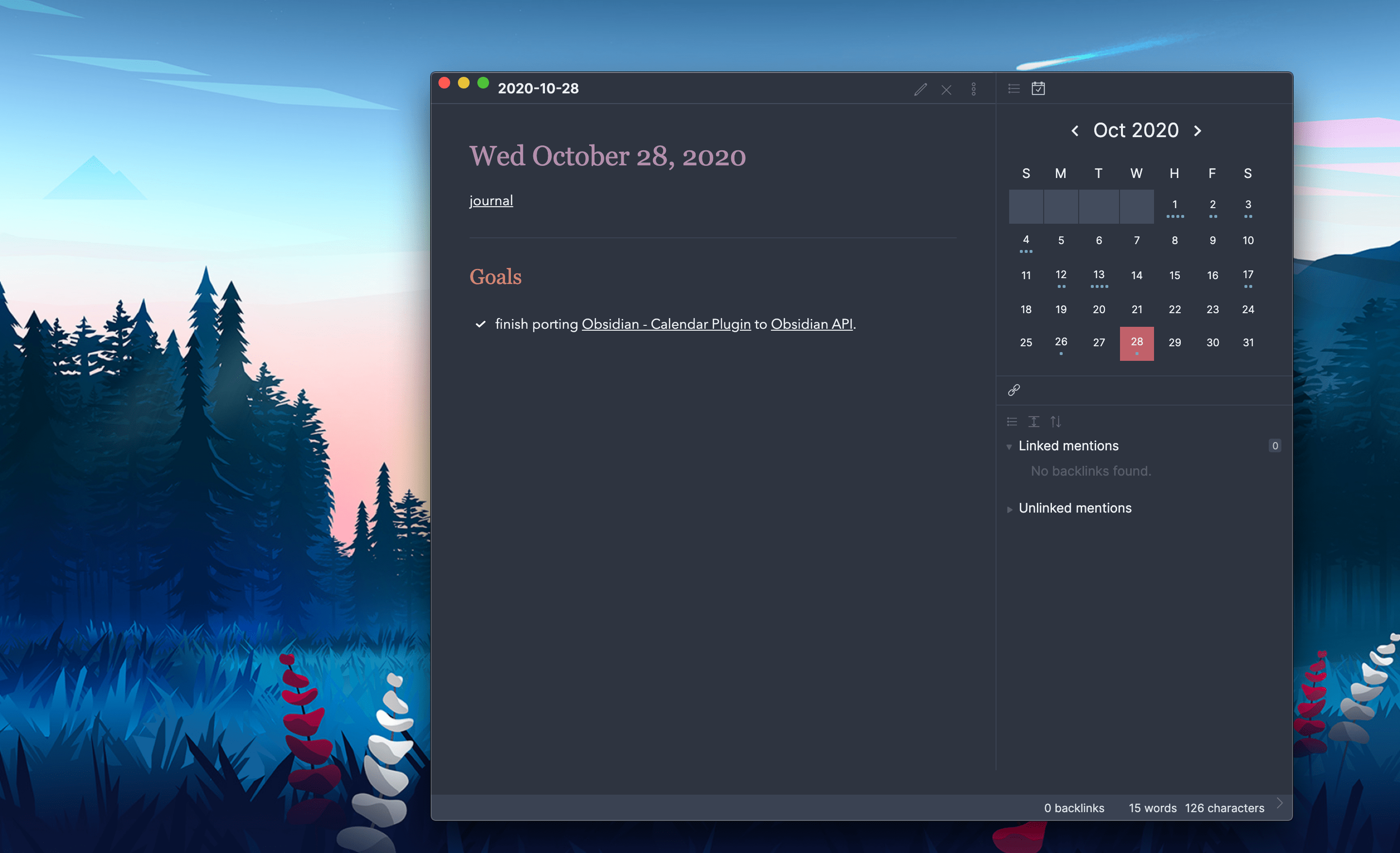
A clean sidebar calendar widget for navigating daily notes and tracking journaling habits.
Liam Cain is credited as the original plugin creator. Setup notes, fit assessments, and cautions below are Obsidian Mate editorial guidance. How we review resources
Overview
The Calendar plugin by Liam Cain adds an elegant sidebar widget for navigating daily and weekly notes. It provides a visual monthly view of your vault history, showing dot indicators for note length and completion, making it indispensable for daily journalers and daily note users.
Key Features
- Visual monthly calendar view embedded in the Obsidian right sidebar
- One-click creation and opening of daily and weekly notes
- Dot indicators showing note length and word count per day
- Custom start of week and week number toggles
- Deep integration with Obsidian's core Daily Notes plugin
How to Install Calendar
- 1Open Settings, then Community plugins and disable Restricted mode.
- 2Click Browse, search for "Calendar", then Install and Enable.
- 3Click the Calendar icon in the right sidebar to open the view.
- 4Click any date on the grid to instantly open or create that day's note.
How to Use Calendar
Enable and configure Obsidian's core Daily Notes feature first. Calendar reads its date format, destination folder, and template settings, so clicking a date opens the matching note or offers to create it.
For a preview without replacing the active note, hold Ctrl or Cmd while hovering over a calendar cell. The Calendar view can also be dragged to another sidebar or into the main workspace.
A Practical Daily-Note Routine
Use Calendar as navigation rather than a second scheduling database. Click today to journal, click a future date to prepare a plan, and use the dots to spot gaps in a logging habit. A hollow dot indicates incomplete tasks; solid dots approximate word count and can be recalibrated in settings.
Settings That Matter
- Choose locale, Sunday, or Monday as the first day of the week so the grid matches your planning system.
- Adjust Words per Dot or set it to zero when writing-volume indicators are distracting.
- Keep creation confirmation enabled while learning the plugin to prevent accidental empty notes.
- Use the separate Periodic Notes plugin for maintained weekly-note configuration.
What Calendar Does Not Replace
Calendar navigates date-named notes; it is not a meeting calendar, time-blocking system, or task scheduler, and it does not import events. Use a calendar integration for external events and Tasks for cross-vault due-date queries.
Repository Screenshots & Visual Preview
Rich preview screenshots and visual assets extracted directly from the official GitHub repository for Calendar:
Details
- GitHub stars
- 2.5k+
Frequently Asked Questions
Does the Calendar plugin require Periodic Notes?
No. It works out of the box with Obsidian's core Daily Notes plugin, though Periodic Notes adds support for weekly and monthly note navigation.
Sources and Documentation
This guide was checked against the creator's repository and primary documentation.
Related Obsidian Plugins
Periodic Notes
Create and manage daily, weekly, monthly, quarterly, and yearly notes with customizable templates and folder organization.
Day Planner
Time-blocking and daily schedule management inside Obsidian. Write a time-blocked plan in your daily note and see it rendered as a visual timeline in the sidebar.
Full Calendar
A Google Calendar-style interface inside Obsidian. Reads events from daily notes, tasks, and external ICS feeds (Google, Outlook, iCloud) in weekly or monthly views.
Natural Language Dates
Parse natural language dates and times in Obsidian. Type 'next Monday' or 'in 3 weeks' and instantly get formatted date links. Works with daily notes and Templater.
Related Guides

7 Obsidian Plugins by Workflow: What They Add and What to Check
A workflow-based guide to seven Obsidian plugins for sync, visualization, calendars, planning, and writing, with selection criteria, limitations, and safety checks.

Build an Obsidian Second Brain With Claude Code
Design a reviewable Obsidian and Claude Code system for capture, daily planning, research, and weekly synthesis without treating AI output as memory or fact.
Explore more Obsidian resources
Discover more plugins, themes, templates, and starter vaults to build your perfect Obsidian setup.