Obsidian Git
Back up your Obsidian vault automatically to GitHub, GitLab, or Gitea with version control.
Vinzent is credited as the original plugin creator. Setup notes, fit assessments, and cautions below are Obsidian Mate editorial guidance. How we review resources
Overview
Obsidian Git automates vault backups using Git version control. Developed by Vinzent, it allows you to automatically commit and push your notes to a remote repository (like GitHub or GitLab) on a customizable interval. It gives you full version history, diff viewing, and automatic disaster recovery.
Key Features
- Automatic commit and push timer (e.g. every 5, 10, or 30 minutes)
- Commit and push on vault close or note save
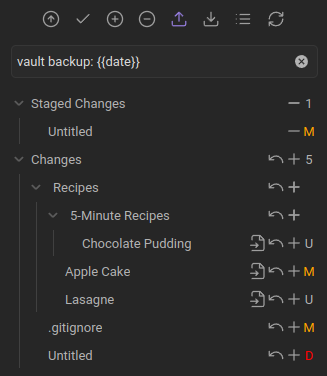
- Line-by-line diff viewer and history tracker inside Obsidian
- Branch management and merge conflict resolution
- Works with GitHub, GitLab, Gitea, and self-hosted Git remotes
How to Install Obsidian Git
- 1Ensure Git is installed on your computer and your vault is initialized as a Git repository.
- 2Open Settings, then Community plugins, search for "Obsidian Git", install and enable it.
- 3Open Obsidian Git settings and configure auto-commit and push intervals.
- 4Use command palette (Ctrl/Cmd + P) to run "Obsidian Git: Commit all and push".
How to Use Obsidian Git
Start with manual pull, commit, and push commands until authentication and conflict handling work. Then enable an automatic interval that fits how often the vault changes. A ten-minute interval is a reasonable desktop starting point, but large repositories may need longer.
Use a private remote for personal notes and review .gitignore before the first push. Git records history; it does not encrypt note contents or make a public repository private.
A Safer First-Backup Workflow
- Install regular Git on desktop; GitHub Desktop alone does not satisfy the Windows requirement in the official guide.
- Create or clone a private remote, authenticate in the terminal, and confirm one manual pull and push before enabling automation.
- Commit a test-note change, verify it remotely, then restore an earlier version so recovery is familiar before an emergency.
- Pull before editing on another device and push when finished. Git supports asynchronous synchronization, not live co-editing.
Example .gitignore
Workspace files change frequently and are device-specific, so many vaults exclude them while retaining settings meant to travel between desktops. Decide separately whether large attachments belong in Git.
.obsidian/workspace.json
.obsidian/workspace-mobile.json
.trash/
.DS_Store
Mobile and Conflict Limitations
- The official guide describes the mobile implementation as unstable and recommends alternatives when reliability matters.
- Mobile uses isomorphic-git: SSH authentication, rebase, and submodules are unsupported, and repository size is constrained by memory.
- Automatic pulls can conflict with independently edited notes. Keep another backup and learn to inspect conflict markers.
- Linux Snap and Flatpak packaging can prevent Obsidian from reaching the system Git installation.
Repository Screenshots & Visual Preview
Rich preview screenshots and visual assets extracted directly from the official GitHub repository for Obsidian Git:
Details
- GitHub stars
- 8k+
Frequently Asked Questions
Does Obsidian Git work on iOS/Android?
The plugin includes a mobile implementation based on isomorphic-git, but its official guide calls mobile support unstable. SSH authentication, rebase, and submodules are unavailable there, and large repositories may exceed device memory.
Will my notes remain private on GitHub?
Yes, as long as you create a Private Repository on GitHub or GitLab.
Sources and Documentation
This guide was checked against the creator's repository and primary documentation.
Related Obsidian Plugins
Git Vault Sync
One-click Git sync for Obsidian on desktop and mobile: no system Git required.
Self-hosted LiveSync
Real-time vault sync using CouchDB or object storage (MinIO, S3, R2) with end-to-end encryption. Full privacy: your vault, your server, your rules.
Remotely Save
Sync your vault across devices for free using S3, Dropbox, OneDrive, Backblaze B2, or WebDAV. The #1 alternative to Obsidian's paid Sync.
Sync Vault CE
Professional cloud sync with zero-space VFS, 4K streaming, encryption, and a built-in media player.
Related Guides
How to Sync an Obsidian Vault: Choose Git, Cloud, or Obsidian Sync
Choose one safe sync architecture for Obsidian. Compare Obsidian Sync, Git, cloud-storage plugins, and desktop folders with conflict recovery, security checks, and practical limits.

7 Obsidian Plugins by Workflow: What They Add and What to Check
A workflow-based guide to seven Obsidian plugins for sync, visualization, calendars, planning, and writing, with selection criteria, limitations, and safety checks.

Obsidian vs Notion in 2026: Which Fits Your Workflow?
Compare Obsidian and Notion across storage, offline work, collaboration, customization, privacy, and portability without invented benchmark scores.
Explore more Obsidian resources
Discover more plugins, themes, templates, and starter vaults to build your perfect Obsidian setup.